
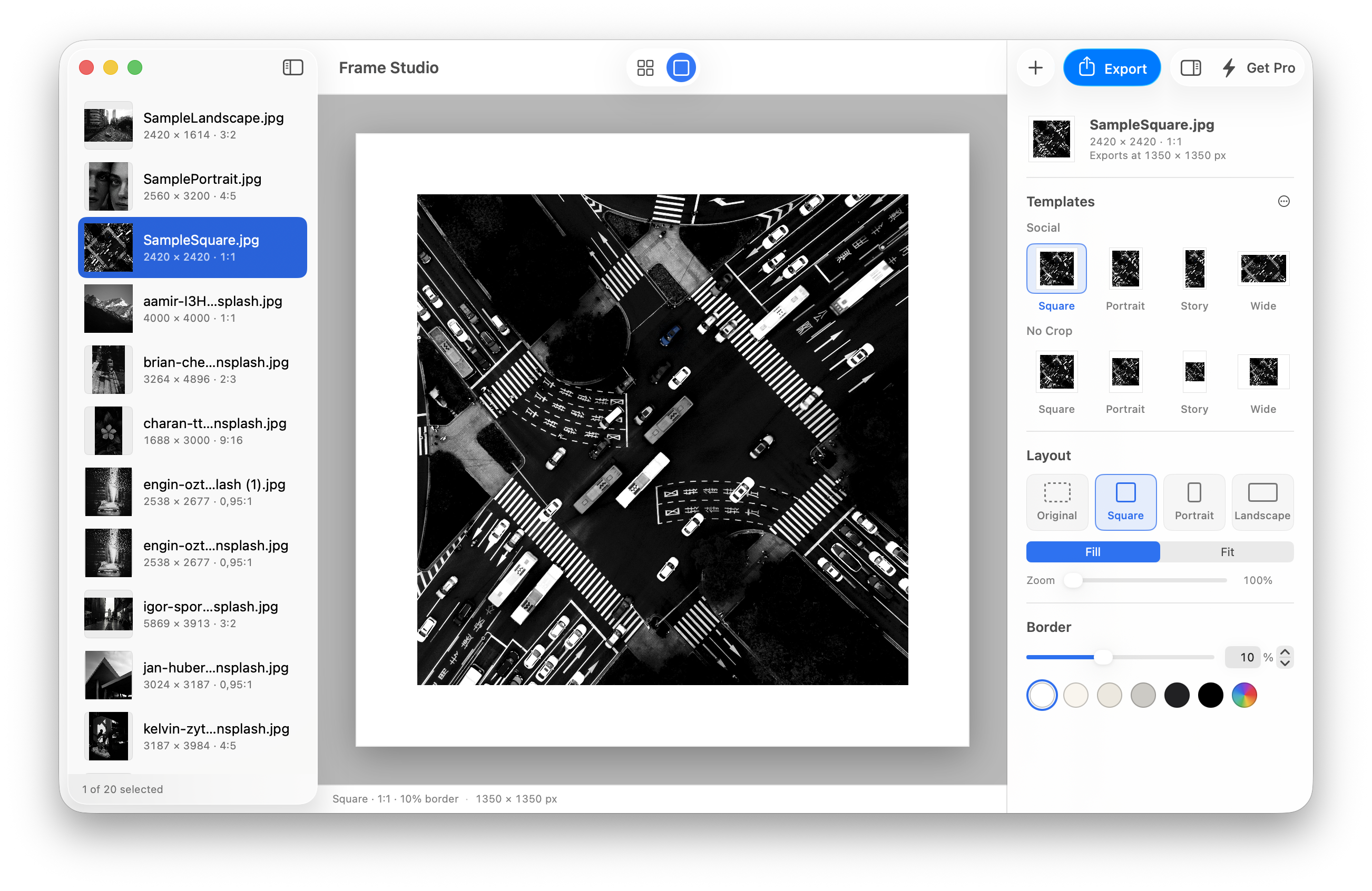
What it does
Finish editing a photo. Open some other app, draw a white rectangle, drop the photo in, squint, nudge, export — then notice the border came out thicker on the left. Then do it again for the next forty photos.
Frame Studio Pro is the app that skips all of that. Pick a shape, a border width and a color, and the frame appears on your own photo rather than on a grey rectangle. When it looks right, export it, or put the same look on the rest of the shoot.
The border is a percentage of the photo’s shorter side, so a 10% mat carries the same weight on a portrait as on a landscape. Frame a mixed batch and it looks like a set.
Your originals are never touched. Every export is a new file, saved where you choose.
How to use it
- Add your photos. Drag photos, or whole folders, onto the window or the Dock icon, or press ⌘O. Any image format your Mac can open works, including JPEG, HEIC, PNG and TIFF.
- Pick a look. Choose one of the eight built-in templates, in two groups: Social and No Crop. Each one previews on the photo you’re editing.
- Adjust it. Set the shape, the border width and the color in the inspector. Press F for a full-screen preview, and flip the backdrop between white and black to judge the mat.
- Export. One photo gets a save dialog; a selection goes to a folder. Export as JPEG, with a quality slider that shows the file size first, or as lossless PNG.
Made for wherever your photos end up
- Instagram crops. You don’t have to. One click for a Square, a 4:5 Portrait, a 9:16 Story or a Wide post. The No Crop templates fit the whole photo inside the post, so every horizon, head and elbow stays attached.
- Flickr is where photos go to be seen big. Export Large (2048 px), Extra Large (4096 px), or any size up to 8000 px, at 1× or 2×.
- A mat is what makes a print look finished. Colors that belong on paper — White, Warm White, Bone, Stone, Charcoal and Black — or any color from the Mac’s color picker, saved to your own palette. 8000 px on the long edge is roughly a 26-inch print at 300 ppi.
What’s inside
- Templates that learn. Right-click a template to make it the default for new photos, to keep a border width or color you just changed, or to revert it. Save your own and file them in your own groups.
- The whole shoot at once. Select any number of photos and the inspector edits them all. Where they disagree a control says Mixed; change it and they agree.
- Copy a look, paste it anywhere. Copy just the layout, just the border or just the color, from a photo or from a template, and paste it onto the rest.
- Every shape worth having. Original keeps each photo’s own proportions. Square, Portrait (4:5, 3:4, 2:3, 9:16) and Landscape (5:4, 4:3, 3:2, 16:9) cover the rest. Fill trims to the frame; Fit keeps every pixel.
- Virtual copies. See the same shot as a square and as a story without duplicating a file. Press ⌘D.
- Export without waiting. Batches are written in the background with progress in the toolbar, and the app asks what to do about files already there: keep both, replace or skip.
- Undo that makes sense. A whole slider drag is one ⌘Z, not forty.
- Private by design. No account, no analytics, no tracking, and nothing ever leaves your Mac. Exports don’t carry your camera details or location, so a framed photo doesn’t tell the internet where you took it.
Requires macOS 26.6 or later.
Free, and Pro
Free is the real thing, not a demo. Everything that makes a frame is free, and free exports are never watermarked.
| Free, forever | Pro, one purchase |
|---|---|
| Every shape, border, color and template | Edit any number of photos together |
| Your own templates, and virtual copies | Export a whole selection to a folder |
| Copying a frame from one photo to another | Pasting a frame onto many photos at once |
| Exports at 1350 px, never watermarked | Large, Extra Large, 2×, and custom sizes up to 8000 px |
1350 px is the long edge of Instagram’s largest native size, so the free version covers every format Instagram actually displays. Pro is a one-time purchase, not a subscription. It never expires, and it’s yours on every Mac signed in to the same Apple Account.
Keyboard
| Keys | Action | Keys | Action |
|---|---|---|---|
| ⌘O | Add photos | ⌘1 / ⌘2 | Grid / Single |
| ⇧⌘E | Export | ⌥⌘I | Toggle inspector |
| ⌘A | Select all | ⌫ | Remove from session |
| ⇧⌘C | Copy settings | ⇧⌘V | Paste settings |
| ← → ↑ ↓ | Move selection | ⇧ + arrow | Extend selection |
| F | Full-screen preview | ⌘D | Duplicate as virtual copy |
| ⌘C / ⌘V | Copy / paste photos | ⎋ | Back to grid |
| ↩ | Open the selection | ⌘Z | Undo (a slider drag is one step) |
Support
If something isn’t working, or you have a question or an idea, email me at [email protected]. I read and answer every message myself.
If you’re reporting a problem, it helps to include your macOS version (Apple menu › About This Mac), the Frame Studio Pro version (choose About from the Frame Studio Pro menu), what you did, what you expected, what happened instead, and a screenshot if it shows the problem. There’s no need to send your photos.
I bought Pro, but it’s locked on another Mac
Make sure that Mac is signed in to the App Store with the Apple Account you bought Pro with, then choose Frame Studio Pro › Restore Purchases.
How do I get a refund?
Purchases are made through Apple, so Apple handles refunds. Go to reportaproblem.apple.com, sign in, and choose the purchase. I’m not able to issue refunds myself.
Will Frame Studio Pro change my original photos?
No. Exports are new files, saved where you choose, with “-framed” added to the name unless you change it. Frame Studio Pro never replaces an existing file without asking, unless you set Existing Files to Replace in the export options.
Why don’t my exports have the original’s camera details or location?
Each export is a new image, so it doesn’t carry over the original photo’s metadata: no camera, capture date or location. It also means a framed photo you share doesn’t reveal where it was taken.
Changelog
1.0.0 - Launch
Initial release:
- Eight built-in templates, in Social and No Crop groups, previewed on your own photo
- Every shape, with Fill and Fit, plus border width and color controls
- Your own saved templates, colors and template groups
- Virtual copies, and copying a frame from one photo to another
- Batch editing and export for any number of photos
- JPEG with a live file-size estimate, or lossless PNG, up to 8000 px and 2×
- Full-screen preview with a white or black backdrop
- Light and dark mode support
Privacy
Effective September 23, 2026
Frame Studio Pro is a Mac app that puts borders around photos. It is made by Igor Putina, an independent developer based in Chișinău, Republic of Moldova (“I”, “me”). This policy explains what happens to your information when you use it.
In short
Frame Studio Pro does not collect any data about you. It has no accounts, no analytics, no advertising, no tracking and no third-party code. Your photos are processed on your Mac and are never sent anywhere. I cannot see what you frame, how you use the app, or who you are.
What the app collects
Nothing. Frame Studio Pro does not collect, transmit, sell, rent or share:
- your name, email address or any other contact details;
- your photos, the images you export, or any information about them;
- your location;
- usage data, such as which features you use or how often;
- diagnostic data, such as crash logs or performance measurements;
- device, advertising or other identifiers;
- your purchase history or payment details.
The app has no code of its own that connects to the internet. It does not track you across apps or websites owned by other companies, and never asks for permission to. Its App Store privacy label reads “Data Not Collected”.
Your photos
Frame Studio Pro can open only the photos you give it: by choosing them in the Open dialog, dragging them in, or pasting them. The macOS App Sandbox enforces this, so the app cannot read any other file on your Mac.
Your photos are processed entirely on your Mac. The app never changes your original files, and it keeps nothing of them once you quit — it does not save your session.
Exported images are written only to the place you choose. Each one is a new image drawn from scratch, so it does not carry over your original photo’s metadata: no camera details, no capture date, no location. Apart from its size and colour profile, the only information the app writes into an exported file is the text “Exported with Frame Studio” as the name of the software that made it.
Settings stored on your Mac
The app remembers your choices between launches — frame settings, your saved templates and
colours, export settings and view options. macOS keeps ordinary window positions and the
last folder you browsed in the Open dialog alongside them. None of this includes your
photos or their names. It is stored only on your Mac, inside the app’s own sandbox folder,
and is never sent to me or anyone else. To remove it, delete the app and the folder
~/Library/Containers/com.tinymightyapps.FrameStudio.
Purchases
The Pro unlock is sold through Apple’s In-App Purchase. Apple processes the payment and handles your Apple Account under Apple’s Privacy Policy. The app only asks macOS whether Pro has been bought on your Apple Account. I never receive your name, email address, Apple Account or payment details. From Apple I receive only aggregated sales reports, such as how many copies were sold in each country, which do not identify you.
Information Apple may share with developers
If you have turned on Share with app developers in System Settings › Privacy & Security › Analytics & Improvements, Apple may share crash reports and app usage statistics with the developers of the apps you use, including me. Apple decides what these contain and governs them under its own privacy policy, and you can turn the setting off at any time. I use anything I receive this way only to find and fix problems in the app.
Third parties
The app contains no third-party libraries, software development kits, analytics, advertising or crash-reporting services. I do not sell or share personal information, including as those terms are defined in the California Consumer Privacy Act, and have not done so.
If you contact me
If you email me, I receive your email address and whatever you choose to write. I use it only to reply to you and to help with your request, relying on my legitimate interest in answering the people who write to me. I don’t add you to any mailing list and don’t share your message with anyone. Your message is stored by my email provider, which may be in another country. I keep it only as long as needed to deal with your request, and I will delete it whenever you ask.
Children
Frame Studio Pro is suitable for all ages. Because it collects no data from anyone, it collects none from children.
Your rights
Depending on where you live, laws such as the EU and UK General Data Protection Regulation, the data protection law of the Republic of Moldova and US state privacy laws give you the right to access, correct, delete, restrict or object to the processing of your personal data, to receive a copy of it, and to withdraw any consent you have given.
The app holds no personal data about you, so there is nothing in it to access or delete. If you have emailed me, you can use any of these rights over that correspondence by writing to the address below; I will respond within 30 days. You also have the right to complain to the data protection authority where you live, or in Moldova to the National Center for Personal Data Protection.
Changes to this policy
If this policy changes, the new version will be published here with a new effective date. I will not begin collecting any data without first updating this policy and the app’s App Store privacy label, and asking for your consent where the law requires it.
Contact
Igor Putina
Chișinău, Republic of Moldova
[email protected]
Terms of Use
Frame Studio Pro is licensed under Apple’s Standard End User License Agreement.