
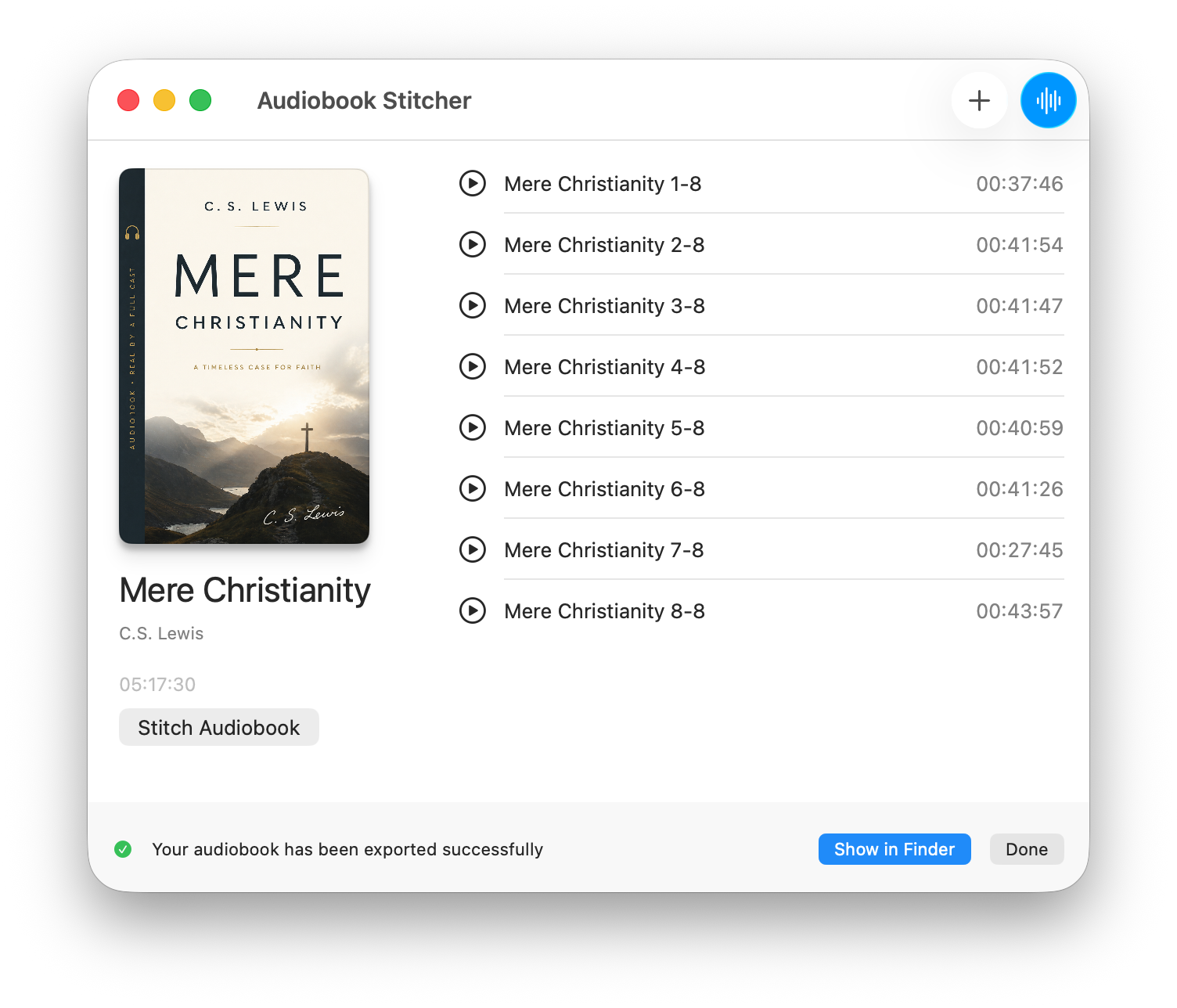
What it does
Audiobook Stitcher takes a folder of audio files — chapters, parts, recordings — and combines them into a single M4B audiobook file. It handles the stitching, sets the chapter markers, and lets you fill in the metadata (title, author, cover art) before exporting. The result is a clean file that works with any audiobook player: Apple Books, Overcast, Prologue, or anything else that supports M4B.
It’s built for people who download public domain audiobooks in pieces, rip CDs, or record their own narrations and want a proper finished file at the end.
How to use it
- Add your files. Drag in your audio files or click the + button. Audiobook Stitcher accepts MP3, M4A, AAC, and WAV. Files are ordered by filename, so a simple numbering scheme (
01.mp3,02.mp3, etc.) keeps things tidy. - Set the metadata. Give your audiobook a title, author, and optionally a cover image. Each file becomes a named chapter — you can rename chapters individually if needed.
- Stitch. Click the Stitch Audiobook button. Audiobook Stitcher processes the files, writes the chapter table of contents, and saves the M4B to a location of your choice.
Changelog
1.0.0 — Initial release
- Import MP3, M4A, AAC, and WAV files
- Set title, author, and cover art
- Automatic chapter markers from file order
- Custom chapter names
- Export to M4B
- Light and dark mode support